
MATLAB
MATLAB & Simulink Campus-Wide offerings
- R2026a-Product List Campus-Wide Offerings – Click Here
- MATLAB Account Creation Installation Links – H K Kalchuri Education Trust – Click Here
- MATLAB Campus Training Poster – Lakshmi Narain College of Technology – Click Here
- MATLAB Student Handout – Lakshmi Narain College of Technology – Click Here
- MATLAB Campus Poster – Lakshmi Narain College of Technology – Click Here
- Resources for Research with MATLAB – Lakshmi Narain College of Technology – Click Here
MathWorks Account Creation
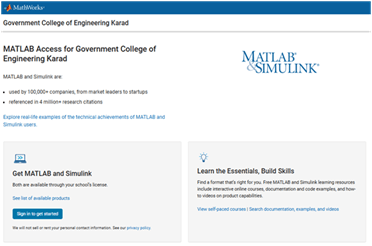
- Go to the MATLAB Portal – Click Here
- Click on “Sign in to get started”.
- Create/Log into MathWorks account.
- Complete the steps to create your MathWorks Account.
- Once logged in on the Portal, you would automatically be associated to the MATLAB Campus-Wide License.
Steps To Install MATLAB on Personal Computer/Laptop
- Click the download button for the current release. (Users can also download previous releases here).
- Choose a supported platform and download the installer.
- Run the installer.
- In the installer, select Log in with a MathWorks Account and follow the online instructions.
- When prompted to do so, select the Academic – Total Headcount license labeled Individual.
- Select the products you want to download and install.
- Click “finish” to complete the activation process.
LINKS
- MATLAB Portal –https://in.mathworks.com/academia/tah-portal/h-k-kalchuri-education-trust-31780921.html
- MATLAB Online –https://www.mathworks.com/products/matlab-online.html
- MATLAB Academy – https://matlabacademy.mathworks.com/
- MATLAB Grader –https://grader.mathworks.com/
- MATLAB System Requirementshttps://www.mathworks.com/support/requirements/matlab-system-requirements.html
- Webinars –https://www.mathworks.com/videos/search.html
- Student Competitions – https://www.mathworks.com/academia/student-competitions.html